Imagine working at a large enterprise where your team creates thousands of documents every week—product roadmaps, HR policies, engineering manuals, customer support logs, and sales guides. A new employee joins your team and spends three hours trying to find the exact instructions on how to file an expense report or update a database schema. They ask around on Slack, search through messy shared folders, and eventually interrupt a senior colleague. This scenario happens thousands of times a day in organizations worldwide. Valuable time is lost hunting for information that already exists somewhere on a server.
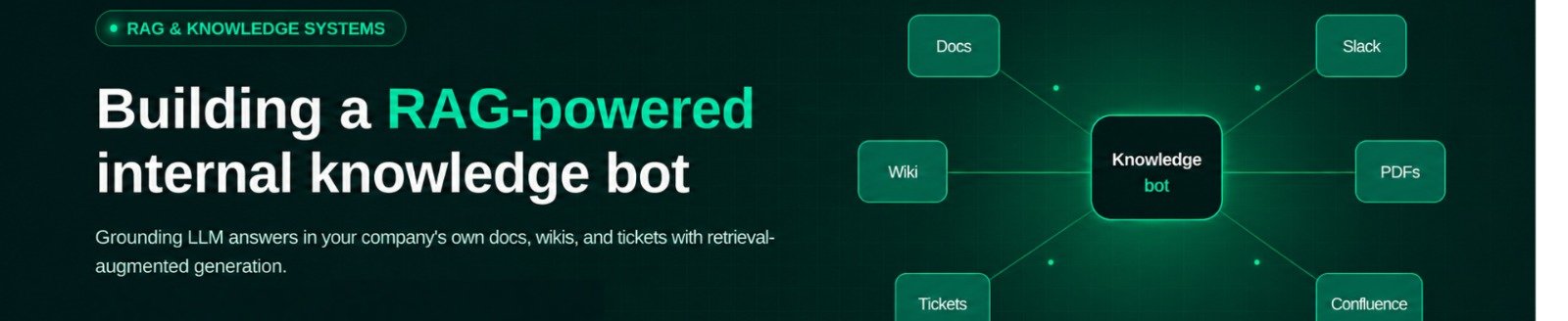
The internal knowledge bot is an RAG -powered chatbot. If you have heard whispers about Artificial Intelligence transforming the workplace, you have likely heard the term "RAG." While it sounds like high-tech jargon, the concept is simple, practical, and changing how companies operate. Let us now understand the basics of RAG-powered chatbots and learn how to build them.
What is a RAG Chatbot for Enterprise?
Popular AI assistants are trained on vast amounts of public information found on the internet. They are like brilliant university graduates who have read millions of books, but they have never read your company’s private employee handbook or proprietary software documentation.
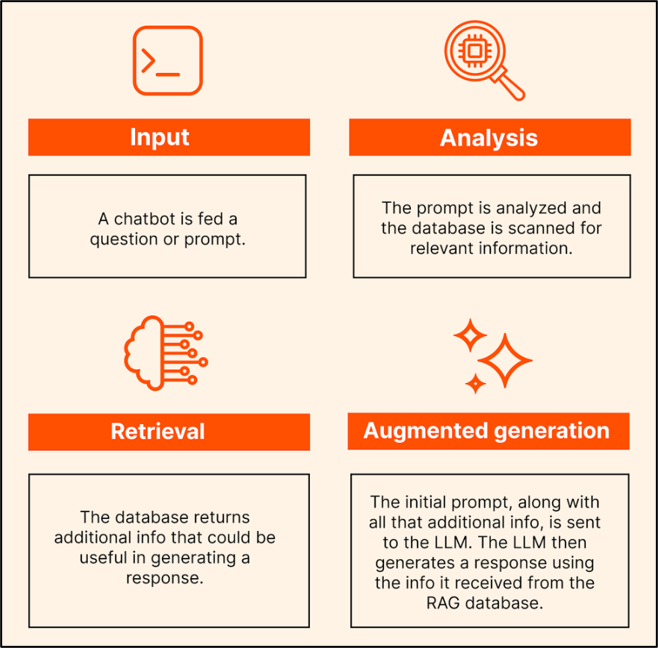
If you ask a standard AI model a specific question about your internal business processes, it will either guess blindly—a phenomenon known as "hallucination"—or admit it has no idea. This is where RAG (Retrieval-Augmented Generation), comes to the rescue. Think of RAG as giving an open-book test to a smart assistant. Instead of forcing the AI to rely solely on its memory, a RAG system acts like an ultra-fast, incredibly organized corporate librarian. When an employee types a question into the internal chat window, the system does not immediately start writing an answer.
Instead, it does the following:
- Searches through your secure company databases, PDFs, wikis, and document stores in milliseconds to find the exact pages or paragraphs containing the answer.
- Retrieves those specific snippets of text.
- Augments (feeds) that verified context directly to the AI model.
- Generates a clear, conversational, and accurate response based only on your company's actual documents, complete with source citations.
For enterprise teams, employees can get instant, trustworthy answers without digging through endless folders, and the organization maintains total control over its private data without retraining expensive AI models from scratch.
A Brief on Enterprise RAG System Architecture
Building a production-ready enterprise RAG chatbot is not just about plugging an AI model into a folder of PDFs. It requires a structured system architecture designed for security, accuracy, and scale. Think of this architecture as a multi-layered corporate office where each department has a specific job:
The Enterprise Knowledge Layer
As the foundation of the system, the enterprise knowledge layer includes all the places where your company stores information: cloud drives, customer relationship management (CRM) tools, enterprise resource planning (ERP) systems, internal wikis (like Notion or Confluence), and policy libraries. Security and permissions live at this layer, ensuring that regular employees cannot query sensitive HR documents or executive compensation files they are not authorized to see.
The Representation and Vector Storage Layer
Computers do not understand human language the way we do; they understand numbers. In this layer, your company documents are broken down and translated into mathematical representations called embeddings. These embeddings capture the meaning of the text rather than just matching exact keywords. They are stored in a special database called a vector database (such as Pinecone, ChromaDB, or pgvector) designed for lightning-fast similarity searches.
The Retrieval and Reranking Layer
When a user asks a question, this layer searches the vector database to find the most relevant pieces of text. In advanced enterprise architectures, a second step called reranking is applied. Reranking acts like a meticulous editor, reviewing the retrieved snippets and sorting them so the absolute best, most contextually relevant answers rise to the very top before the AI ever sees them.
The Generation Layer
This is where the Large Language Model (LLM)—such as models from OpenAI, Anthropic, or open-source alternatives—takes center stage. It receives the user’s question alongside the cleanly retrieved text snippets and synthesizes a professional, easy-to-read response. Crucially, it is instructed to stay strictly within the boundaries of the provided documents, preventing it from making things up.
 source
6 Steps to Build a RAG Chatbot
Building an enterprise knowledge bot does not have to be an overwhelming engineering nightmare. By following a structured, step-by-step approach, teams can build a reliable prototype and scale it into a robust production tool.
Step 1: Define Your Knowledge Scope
Do not try to feed every single document in your entire corporation into the bot on day one. Start small and focused. Choose a single department or use case—such as an HR policy helper for new hires or a technical documentation assistant for developers. A clear scope improves retrieval relevance and reduces governance risks.
Step 2: Clean and Chunk the Content
Enterprise documents come in all shapes and sizes: messy PDFs, slide decks, markdown files, and scanned agreements.
- Cleaning: Remove irrelevant headers, footers, and formatting noise.
- Chunking: Large documents must be broken down into smaller, bite-sized pieces (or "chunks"). If a document is 50 pages long, passing the whole thing at once confuses the AI. Breaking it into paragraphs or small sections ensures the retrieval tool can pinpoint the exact sentence needed to answer a query.
Step 3: Generate Embeddings and Store Them
Next, pass your clean document chunks through an embedding model. This model converts your text chunks into vectors (strings of numbers) that capture semantic meaning. Store these embeddings inside your chosen vector database, attaching useful metadata (like document titles, author names, or access permissions) to each chunk so the system can filter results securely later.
Step 4: Implement Semantic Retrieval and Re-ranking
Now that your data is indexed, build the query logic. When an employee types a question:
- The system converts the question into a vector query.
- It searches the vector database for matching chunks based on conceptual meaning.
- It applies a reranking model to weed out weakly related snippets, ensuring high precision.
Step 5: Connect to the LLM and Build the User Interface
With the best context safely retrieved, assemble the final prompt. The prompt instructs the LLM: "Here is the user's question, and here are the verified company documents that contain the answer. Write a helpful response based only on this text, and cite your sources."
Wrap this backend logic into a clean, intuitive user interface—such as a Slack bot, a Microsoft Teams integration, or a simple internal web page built with frameworks like Streamlit—so employees can chat with the knowledge base naturally.
Step 6: Test, Monitor, and Refine
A RAG system is not a "set-and-forget" project. Enterprise knowledge changes constantly: policies update, products evolve, and new documents are published.
- Dynamic Loading: Ensure your system updates its index automatically when documents change.
- Feedback Loops: Allow users to thumbs-up or thumbs-down answers so your team can spot retrieval failures and continuously tune chunk sizes, prompts, or embedding models.
Building a RAG-powered internal knowledge bot bridges the gap between massive amounts of trapped company data and the employees who need it every day. By combining secure document storage, smart semantic retrieval, and safe AI generation, enterprises can stop wasting hours searching for answers and start working smarter. Start small, focus on data quality, design with governance in mind, and watch your team's productivity transform.
With companies on the lookout for expanding their enterprise teams, you have a lot of opportunities to transform operations and bring true value to the organization or client. Eduinx, a leading pioneer in edtech, is here to help you reshape your career. With our non academic mentors, you can get the right guidance in building RAG powered internal knowledge to achieve organizational goals. Whether you are a working professional looking for a career breakthrough or a budding entrepreneur looking to transform operations, Eduinx is here to help you. Learn more about building knowledge bots and AI through our courses.
Frequently Asked Questions (FAQs)
1. What is a RAG chatbot for enterprise use?
A RAG chatbot is an AI chatbot that uses a company’s private and approved knowledge base to answer questions from employees.
RAG = Retrieval-Augmented Generation
Instead of just using the information it was trained on, the chatbot can look up information from the company’s private database, PDFs, policies, wikis, CRM, etc., and use that to answer the question. The answer should ideally cite the source information as well.
This can make the chatbot more accurate for general knowledge and policy-related questions such as:
- What is our leave policy?
- How to request access to a particular software?
- What is the procedure for escalating a customer support ticket?
- How to set up a particular internal application?
The chatbot can’t remove all hallucination risk, but should be able to reduce it.
2. What problem does an internal knowledge bot actually solve?
It eliminates the daily time-consuming search and spend problem that employees experience on multiple and disjointed sources like messy shared folders, Slack threads, and outdated wikis for information that already exists somewhere in the company. Employees don't have to interrupt a senior colleague or search for hours to find the answer; instead, they have an instant and reliable reply that's sourced from verified internal documents.
3. How does the RAG-powered chatbot compare with a standard AI model?
A basic AI model is taught using data from the public internet, but has never seen a company's internal employee handbook or documentation, and must guess or say that it does not know. A RAG-powered chatbot first pulls the relevant text precisely from internal sources and then only uses that verified context to create its response.
4. What are the basic layers of enterprise RAG system architecture?
A production-ready enterprise RAG system usually consists of four layers: enterprise knowledge layer (where the documents are stored – permissions are enforced), representation and vector storage layer (where text is converted into embeddings), retrieval and reranking layer (which is responsible for finding and reranking the most relevant snippets), and generation layer (where LLM writes final answer from verified context).
5. What are the main layers of an enterprise RAG architecture?
An enterprise RAG system in production typically consists of four layers:
- Enterprise knowledge layer that stores documents, policies, databases, wikis, and other information.
- Document-processing and vector-storage layer that extracts text, breaks it into tokens, creates embeddings, and stores them for subsequent retrieval.
- Retrieval and reranking layer that identifies and ranks relevant documents.
- Generation and response layer that uses an LLM to create a response based on the retrieved information.
Enterprise systems often involve additional security and control measures, such as authentication, role-based access control, monitoring, evaluation, audit, logging, and feedback mechanisms.
6. What are the embeddings and why does a RAG chatbot needs it?
The embeddings are vectors that encode the meaning of text rather than just matching key terms, which enable a system to interpret what a text is actually about. When the user asks a question, these embeddings are stored in a vector database such as Pinecone, ChromaDB, or pgvector, which can conduct very high-speed similarity searches.
7. What is the purpose of reranking in RAG pipeline?
The second step of retrieval is the reranking: This is the reranking of the snippets of text that are retrieved in the first step, before the AI model even comes up with the correct response. It serves as a careful editor to eliminate weakly related content, enhance the overall precision of answers.
8. Why is it important for companies to restrict hallucination in their internal AI assistant?
The problem with hallucination is that it suggests an answer rather than stating that the AI is unable to answer a question, a risk that is particularly high in internal business applications such as compliance, HR policy, or engineering documentation. A RAG chatbot minimizes this risk by directing the LLM to remain within the confines of the retrieved company documents, instead of creating new content.
9. What is the best way to choose the scope of knowledge to begin with when developing a knowledge bot?
Rather than dumping the entire document library for the entire company on day one, it's best to start small and focused-in an HR program, maybe a policy helper for new hires; in a technical documentation program, perhaps a technical documentation helper for developers. Early on a clear scope enhances retrieval relevance and diminishes governance risk.
10. How should enterprise documents be prepared before building a RAG chatbot?
Documents should be purged of extraneous headers, footers and formatting clutter, and then divided into smaller pieces, like sentences or paragraphs. If the entire document is passed in as one, it is hard to retrieve, and if it is properly chunked, the system will be able to find the needed sentence for a given query.
11. How do you connect a RAG chatbot's backend to a usable interface?
Once the retrieval and generation code is running, the back end will be wrapped in a nice and user-friendly interface like a Slack bot or a Microsoft Teams integration, or a plain web page through a framework like Streamlit. This enables the staff to communicate in a natural way with the knowledge base, bypassing the technical interface.
12. How can I ensure that a RAG chatbot remains correct over time as the company's documents evolve?
A RAG system should have dynamic loading, meaning that the index should reflect the changes that occur in enterprise knowledge, such as policies, product information, etc., which is constantly changing. Teams can also identify retrieval failures through feedback loops, like thumbs-up/down on answers, or to continually refine chunk sizes, prompts, or embedding models.